Article Filtering
Article filters are JavaScript programs that can change incoming articles, assign labels, extract contents, or reject articles. They can also run on articles already stored in RSS Guard.
Article filters dialog
Use the dialog to create, enable, order, and assign filters to feeds within an account.
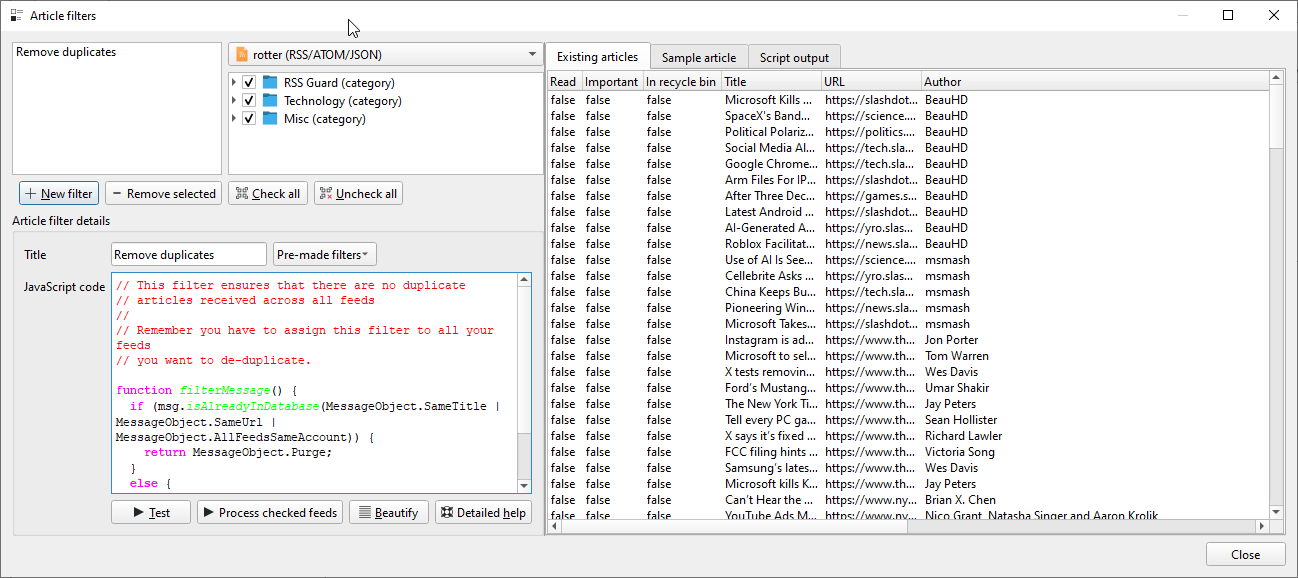
Test runs the selected filter against the loaded stored articles and previews the local database write. It does not save the test articles.
Process checked feeds runs the selected filter against undeleted articles in the checked feeds and reports the actual saving results. Accepted results follow the same saving policy as regular fetching.
Force overwrite of accepted articles starts unchecked, so both actions honor the script’s final msg.overwrite value. Select it to request an explicit overwrite after the script returns Msg.Accept. Test previews the overwrite and Process checked feeds saves the accepted article with its final read and starred states. The checkbox stays selected after Test and clears after Process checked feeds runs. During regular fetching, the script controls msg.overwrite.
The Existing articles table separates the Filter decision from the Database outcome. Accepting an article does not necessarily update its stored row. For example, a filter can return Accept after changing only the score, while the database outcome is Skipped: no update trigger. Label changes are reported separately because they can be saved without updating the article row.
After testing, use Show values to switch between the script result and the expected stored values. Expected stored values include local read/star preservation and retain the stored article when its row would be skipped. Changed values are highlighted, tooltips compare them with the original article, and the detail tabs show metadata and contents. The Output tab displays app.log(...) messages and errors for both Test and Process checked feeds, followed by the run summary.
Processing leaves its per-article results visible and shows a completion summary. An incomplete run retains confirmed results and identifies errors or articles that were not processed. A successful update can also be reported as subsequently removed by feed cleanup. An Updated result means the writer successfully performed the update; it does not claim that every stored value changed. Changing the selected feed or starting another run replaces the displayed results.
Attention
New in 5.3.0: Test now previews the same local saving decisions used by actual processing, including msg.overwrite, both article-update settings, and permanent-deletion protection. The preview applies to the currently loaded articles and the current database state. Processing checked feeds covers all their undeleted articles and may therefore process more articles than a test.
This is a preview of local saving, not a simulation of a later live fetch. Fetching starts with incoming data and runs the enabled assigned filter chain; Test uses stored articles and the selected filter. Later database changes, feed cleanup, script side effects, and earlier purges during a real run can change the eventual outcome. Test does not simulate those effects on later articles.
Attention
Testing does not save changes to the test articles, but it still executes the script. Network requests, external programs, notifications, and actions such as creating account labels can have effects. Inspect unfamiliar scripts before running them.
Visual filter generator
Choose Generate next to Beautify to build a script from conditions, actions, and a result. Conditions can require all or any matches. The matching and non-matching branches have independent actions and results; no conditions means the matching branch applies to every article. The non-matching result defaults to Accept.
Actions can set writable article properties, manage labels, and choose a filtering decision. To request an explicit overwrite, add Set article property for overwrite and set it to true in the appropriate branch. It is opt-in; the generator does not enable it automatically.
Warning
Generating replaces the editor contents; it does not import or modify an existing script. Cancelling leaves the editor unchanged. The generator warns if neither reachable outcome accepts articles. Use handwritten JavaScript for database lookups, full-content extraction, notifications, and external tools.
Writing and running filters
Each script defines a function that returns a FilteringAction:
function filterMessage() {
  return Msg.Accept;
}
During fetching, enabled filters run in ascending sort order on each incoming article. Accept continues to the next filter; other decisions stop that article’s chain. The decision table below describes both fetching and manual processing.
The JavaScript engine is Qt’s QJSEngine. The global msg object is the current article; the other global objects provide feed/account information and helpers. Special user-data placeholders, such as %data%, can be used in scripts.
Warning
Read changing values such as msg.title and run.indexOfCurrentFilter inside filterMessage(). Code outside that function is prepared once for the filtering run and should contain constants or helpers, not cached per-article state. An uncaught script error stops fetching that feed; the testing dialog displays the error directly.
Saving accepted articles
A fetching filter starts with the incoming article, not a copy of the stored article. For local feeds, incoming read/star/trash flags normally start as false, and the score starts at zero. Manual processing and testing start with stored article values instead.
By default, RSS Guard uses its identity, content, state, and date checks to decide whether to update an accepted article during fetching or Process checked feeds. Changing a script property alone does not introduce a new update trigger: for example, changing only local read state, score, or attachments can be skipped in either workflow. New accepted articles are inserted normally.
Explicit overwrite
Attention
New in 5.3.0: set msg.overwrite = true to force saving an accepted article even when ordinary update detection would skip it. This addresses filters whose changes were not saved when an article was fetched again (#2490). Existing scripts retain ordinary fetching behavior until they opt in.
function filterMessage() {
  msg.isRead = true;
  msg.overwrite = true;
  return Msg.Accept;
}
overwrite defaults to false at the start of each article-processing pass. Successive filters share its current value; a later filter can set it back to false. It is a temporary saving instruction, never stored in the database or synchronized to the service. Setting it on a detached article returned by a database lookup does not affect msg.
When overwrite is true, the writer saves the incoming read and starred states, including false, instead of applying local state preservation. It also bypasses body-change suppression and the ordinary date-based update gate. It does not override Ignore/Purge, change article matching, or bypass later feed-level ignoring and cleanup.
Attention
An overwrite saves the complete set of fields supported by the existing article writer, not just properties assigned by your script. Incoming read/star/trash states, score, contents, attachments, and dates can replace stored values. Use getArticleFromDatabase() and explicitly copy any stored values you need to preserve before enabling overwrite. Ordinary updates also use this writer; overwrite = false does not prohibit saving or enable field-by-field merging.
For example, a local feed with stable custom IDs can preserve selected stored state while explicitly marking an article read:
function filterMessage() {
  const previous = msg.getArticleFromDatabase(Msg.SameCustomId);
  if (previous !== null) {
    msg.isImportant = previous.isImportant;
    msg.isDeleted = previous.isDeleted;
    msg.score = previous.score;
  }
  msg.isRead = true;
  msg.overwrite = true;
  return Msg.Accept;
}
This example preserves only the three copied properties. It still uses the incoming body, attachments, and dates. Temporary data such as rawContents does not gain database storage, and overwrite does not replace label associations wholesale: use the label methods for those changes.
Deleted articles and side effects
Attention
A matching permanently deleted database record is protected during article updates, including its label associations. Neither overwrite nor a forced update can alter or restore it, for local or synchronized accounts. Ordinary recycle-bin articles are different: the existing writer can restore them when an eligible update saves isDeleted = false.
Emptying the recycle bin marks records permanently deleted while retaining them for matching. Physically purging records removes that protection, so a later fetch can insert an article again. Matching still relies on the existing identifiers; this protection cannot recognize a different identity as the same article.
Filters run before this persistence check, so their other effects are not undone when a permanently deleted match is skipped. Feed-level ignore rules and article-count cleanup also run after filtering and may prevent an accepted article from being retained. Normal fetch notifications exclude saved articles in trash and permanently deleted records; script calls to app.showNotification() are independent.
Attention
Supported changes can be pushed to an online service even if a filter returns Ignore or Purge. Current automatic handling pushes transitions to read/starred and processes label changes separately; overwrite does not introduce reverse transitions or broader remote synchronization. Local saving decisions do not undo service requests or other script side effects.
Database lookups
Exact isAlreadyInDatabase() and getArticleFromDatabase() include recycled and permanently deleted records. Their Winkler variants search only undeleted records. Choose exact matching when you need to recover stored state for the same article custom ID; similarity matching is intended for finding similar articles.
Lookup criteria are combined with bitwise OR. Without AllFeedsSameAccount, the search is limited to the current feed; with it, the search includes the current account’s feeds. During manual processing/testing, the current stored article is excluded from duplicate matching. The current msg already contains its stored values in that mode.
Returned articles are detached copies. Modifying them does not save them or modify the incoming article; copy the desired properties to msg. The API exposes recycle-bin state as isDeleted, but does not expose the internal permanent-deletion flag.
Practical guidance
Run cheap rejection/duplicate checks before expensive extraction or external commands. Use app.log(...) and the testing table to inspect results. Downloads can slow fetching and enlarge the database; external tools may also depend on your operating system.
Global variables
These global objects are available to your scripts:
Global variable |
What it provides |
|---|---|
|
Information about the actual article being filtered or modified. |
|
Information about the feed the article belongs to. |
|
Account-related information. |
|
Application-wide helper functions such as logging and notifications. |
|
Utility functions for parsing data and reading or writing files. |
|
Information about the current filtering run. |
|
Process-launching helpers for calling external executables. |
Reference Documentation
Here is the complete reference documentation of the functions and properties available to your filtering scripts.
msg
Properties
Name |
Type |
Read-only |
Synchronized |
Description |
|---|---|---|---|---|
|
|
Yes |
Yes |
List of labels assigned to the article. |
|
|
Yes |
No |
List of categories of the article, extracted from the feed. |
|
|
Yes |
No |
List of attachments of the article. |
|
|
Yes |
No |
ID assigned to the message in the local RSS Guard database. |
|
|
Yes |
No |
Opaque custom data associated with the article. Its format depends on the article source; structured data may commonly be encoded as JSON. |
|
|
No |
No |
ID of the message as provided by the remote service or feed file. |
|
|
No |
No |
The message title. |
|
|
No |
No |
The message URL. |
|
|
No |
No |
Author of the message. |
|
|
No |
No |
Contents of the message. |
|
|
No |
No |
Raw contents obtained from the remote service or feed. This is usually raw XML or JSON. It is normally useful only for newly fetched articles, not when testing existing ones from the dialog. |
|
|
No |
No |
Arbitrary number in the range <0.0, 100.0>. Useful for custom ranking and sorting. |
|
|
Yes |
No |
Returns |
|
|
No |
No |
Date and time of the message. |
|
|
No |
No |
Date and time when RSS Guard received this version of the message. |
|
|
No |
No |
Is |
|
|
No |
Yes |
Is the message read? |
|
|
No |
Yes |
Is the message important? |
|
|
No |
No |
Recycle-bin state. This is not the permanent-deletion flag. |
|
|
No |
No |
Defaults to |
Functions
Name(Parameters) |
Return value |
Description |
|---|---|---|
|
|
Adds a multimedia attachment to the article. |
|
|
Removes one attachment from the article according to the index, starting from zero. |
|
|
Removes all attachments from the article. |
|
|
Fetches full contents through the article extractor, in plain text or HTML. Returns whether nonempty contents were obtained. Does not enable overwrite. |
|
|
Checks if a matching message is already stored in the database. |
|
|
Checks if a similar message is already stored in the database by using Jaro-Winkler similarity. |
|
|
Returns a detached copy of the matching article with the highest local ID. See Database lookups for scope and deletion handling. |
|
|
Returns a detached copy of the undeleted matching article with the highest local ID, using Jaro-Winkler similarity. |
|
|
Assigns a label to the message. The |
|
|
Removes a label from the message. The |
|
|
Removes all labels from the message. |
|
|
Creates labels for incoming article categories and optionally assigns them. Does nothing in existing-article processing mode. |
app
Functions
Name(Parameters) |
Return value |
Description |
|---|---|---|
|
|
Prints a message to RSS Guard’s log and to the |
|
|
Displays a desktop notification with the given title and text. |
run
Properties
Name |
Type |
Read-only |
Description |
|---|---|---|---|
|
|
Yes |
Number of messages accepted so far in the current filtering run. |
|
|
Yes |
Zero-based index of the currently executing filter. |
|
|
Yes |
Total number of filters that will execute in the current run. |
acc
Properties
Name |
Type |
Read-only |
Description |
|---|---|---|---|
|
|
Yes |
Database ID of the account. |
|
|
Yes |
Title of the account. |
|
|
Yes |
List of labels currently available for assignment. |
Functions
Name(Parameters) |
Return value |
Description |
|---|---|---|
|
|
Finds a label with the given title. Returns the label ID or an empty string. |
|
|
Creates a label with the given title and color and returns the label ID. If the label already exists, its existing ID is returned. |
feed
Properties
Name |
Type |
Read-only |
Description |
|---|---|---|---|
|
|
Yes |
Custom ID of the feed. |
|
|
Yes |
Title of the feed. |
utils
Properties
Name |
Type |
Read-only |
Description |
|---|---|---|---|
|
|
Yes |
Name of your local machine. |
Functions
Name(Parameter) |
Return value |
Description |
|---|---|---|
|
|
Converts an XML string into JSON. |
|
|
Reads a file into a byte array. |
|
|
Writes a byte array to a file. |
|
|
Reads a text file as UTF-8. |
|
|
Writes text as UTF-8. |
|
|
Converts a textual date/time representation into a proper |
fs
Functions
Name(Parameter) |
Return value |
Description |
|---|---|---|
|
|
Launches an external executable with optional parameters, standard input, and working directory, without waiting for it to finish. |
|
|
Launches an external executable, waits for it to finish, and returns its standard output as text. |
Warning
External processes launched through fs use the RSS Guard user-data folder as the default working directory unless you explicitly pass another one.
Examples
Examples use the saving rules above. Examples that enable overwrite intentionally opt into full-row replacement; adapt their state preservation to your needs.
/*
 * Accept whitelisted articles based on regular-expression filtering.
 */
function filterMessage() {
  const whitelist = [
    /ubuntu.+desktop/i,
    /linux.+app/i,
    /\d.billion/i
  ];

  if (whitelist.some(re => re.test(msg.title))) {
    return Msg.Accept;
  }

  return Msg.Ignore;
}
/*
 * Mark matching articles as important and raise their score on every fetch.
 */
function filterMessage() {
  if (/stock|crypto|market/i.test(msg.title)) {
    msg.isImportant = true;
    msg.score = 80;
    msg.overwrite = true;
  }

  return Msg.Accept;
}
/*
 * Skip likely duplicates by comparing title similarity.
 */
function filterMessage() {
  if (msg.isAlreadyInDatabaseWinkler(Msg.SameTitle, 0.05)) {
    return Msg.Ignore;
  }

  return Msg.Accept;
}
/*
 * Reuse contents from the newest stored article with the same URL.
 */
function filterMessage() {
  const previous = msg.getArticleFromDatabase(
    Msg.SameUrl | Msg.AllFeedsSameAccount
  );

  if (previous !== null) {
    msg.contents = previous.contents;
  }

  return Msg.Accept;
}
/*
 * Fetch fuller contents only for articles that seem new enough to keep.
 *
 * This uses RSS Guard's built-in article extractor automatically.
 */
function filterMessage() {
  if (!msg.isAlreadyInDatabase(Msg.SameCustomId | Msg.AllFeedsSameAccount)) {
    msg.fetchFullContents(false);
  }

  return Msg.Accept;
}
/*
 * Run RSS Guard's article extractor directly on HTML already stored in msg.contents.
 *
 * This is useful when the feed already carries HTML and you want readability cleanup
 * without downloading the article URL again.
 */
function filterMessage() {
  if (!msg.url || !msg.contents) {
    return Msg.Accept;
  }

  const extractor =
    "C:\\Path\\To\\rssguard-article-extractor.exe";

  const config = JSON.stringify({
    html: msg.contents
  });

  const extracted = fs.runExecutableGetOutput(
    extractor,
    [msg.url],
    config
  );

  if (extracted && extracted.trim()) {
    msg.contents = extracted.trim();
  }

  return Msg.Accept;
}
/*
 * Ignore articles older than 7 days.
 */
function filterMessage() {
  let now = new Date();
  let age = (now - msg.created) / (1000 * 60 * 60 * 24);

  if (age > 7) {
    return Msg.Ignore;
  }

  return Msg.Accept;
}
/*
 * During manual processing, purge articles received more than 2 days ago.
 * This differs from msg.created, which is the publication date from the feed.
 */
function filterMessage() {
  let now = new Date();
  let age = (now - msg.retrieved) / (1000 * 60 * 60 * 24);

  if (age > 2) {
    return Msg.Purge;
  }

  return Msg.Accept;
}
/*
 * Assign label "AI" to matching articles.
 * Make sure the label already exists.
 */
function filterMessage() {
  if (/AI|robot|software|hardware/i.test(msg.title)) {
    let id = acc.findLabel("AI");

    if (id) {
      msg.assignLabel(id);
    }
  }

  return Msg.Accept;
}
/*
 * Create labels automatically from message categories.
 */
function filterMessage() {
  msg.exportCategoriesToLabels(true);
  return Msg.Accept;
}
/*
 * Show a desktop notification only for apparently new breaking news.
 */
function filterMessage() {
  if (/breaking/i.test(msg.title) &&
      !msg.isAlreadyInDatabaseWinkler(Msg.SameTitle, 0.05)) {
    app.showNotification("Breaking News", msg.title);
    msg.isImportant = true;
  }

  return Msg.Accept;
}
/*
 * Turn the first attachment into the main article URL.
 */
function filterMessage() {
  if (msg.enclosures.length > 0) {
    msg.url = msg.enclosures[0].url;
    msg.removeEnclosure(0);
  }

  return Msg.Accept;
}
/*
 * Use a keyword file from the user-data folder to assign a score.
 *
 * Each line should be:
 *   keyword,score
 */
function filterMessage() {
  let keywords = [];

  try {
    let fileContent = utils.readTextFile('%data%/keywords.txt');
    keywords = fileContent
      .split(/\r?\n/)
      .map(line => {
        let parts = line.split(',');
        if (parts.length === 2) {
          return { term: parts[0].trim(), score: Number(parts[1].trim()) };
        }
        return null;
      })
      .filter(k => k && !isNaN(k.score));
  } catch (e) {
    app.log('Keywords file missing -> default score 0.');
    msg.score = 0;
    msg.overwrite = true;
    return Msg.Accept;
  }

  let totalScore = 0;

  for (let k of keywords) {
    let re = new RegExp(k.term, 'i');
    if (re.test(msg.title) || re.test(msg.contents)) {
      totalScore += k.score;
    }
  }

  msg.score = Math.min(totalScore, 100);
  msg.overwrite = true;

  if (msg.score >= 70) {
    msg.isImportant = true;
  }

  return Msg.Accept;
}
/*
 * Keep a whitelist in an external text file.
 */
function filterMessage() {
  let keywords = [];

  try {
    let fileContent = utils.readTextFile('%data%\\whitelist.txt');
    keywords = fileContent.split(/\r?\n/).filter(line => line.trim() !== '');
  } catch (e) {
    app.log('No whitelist file found, accepting all articles.');
    return Msg.Accept;
  }

  for (let k of keywords) {
    let re = new RegExp(k, 'i');
    if (re.test(msg.title) || re.test(msg.contents)) {
      msg.isImportant = true;
      return Msg.Accept;
    }
  }

  return Msg.Ignore;
}
/*
 * Convert HTML article contents to plain text.
 */
function filterMessage() {
  let text = msg.contents;

  text = text.replace(
      /<a[^>]+href="([^"]+)"[^>]*>(.*?)<\/a>/gi, (m, url, label) => {
        return label + ' (' + url + ')';
      });

  text = text.replace(/<[^>]*>/g, '');
  text = text.replace(/\s+/g, ' ').trim();

  msg.contents = text;

  return Msg.Accept;
}
/*
 * Convert article contents from HTML to plain text with Pandoc.
 *
 * This uses a Pandoc binary placed directly in the user-data folder.
 */
function filterMessage() {
  let res = fs.runExecutableGetOutput(
      '%data%\\pandoc.exe',
      ['-f', 'html', '-t', 'plain'],
      msg.contents);

  msg.contents = res;

  return Msg.Accept;
}
/*
 * Parse raw XML and log one field while debugging.
 */
function filterMessage() {
  if (msg.rawContents) {
    let rawJson = utils.fromXmlToJson(msg.rawContents);
    app.log(rawJson);
  }

  return Msg.Accept;
}
/*
 * Raise the score for articles published on weekends.
 */
function filterMessage() {
  let day = msg.created.getDay(); // 0 = Sunday, 6 = Saturday

  if (day === 0 || day === 6) {
    msg.score = Math.min(msg.score + 15, 100);
    msg.overwrite = true;
  }

  return Msg.Accept;
}